The screenshots show the Simplified Chinese interface. Button names in your language may differ.
Why a password is unnecessary
A top-up requires identifying the account and applying the upgrade to it. The session data includes the account email, account ID, and tokens from your current sign-in, which are enough to carry out those steps.
Keep your password and email verification codes private. Decline any request to change your linked email as part of a top-up.
What chatgpt.com/api/auth/session shows
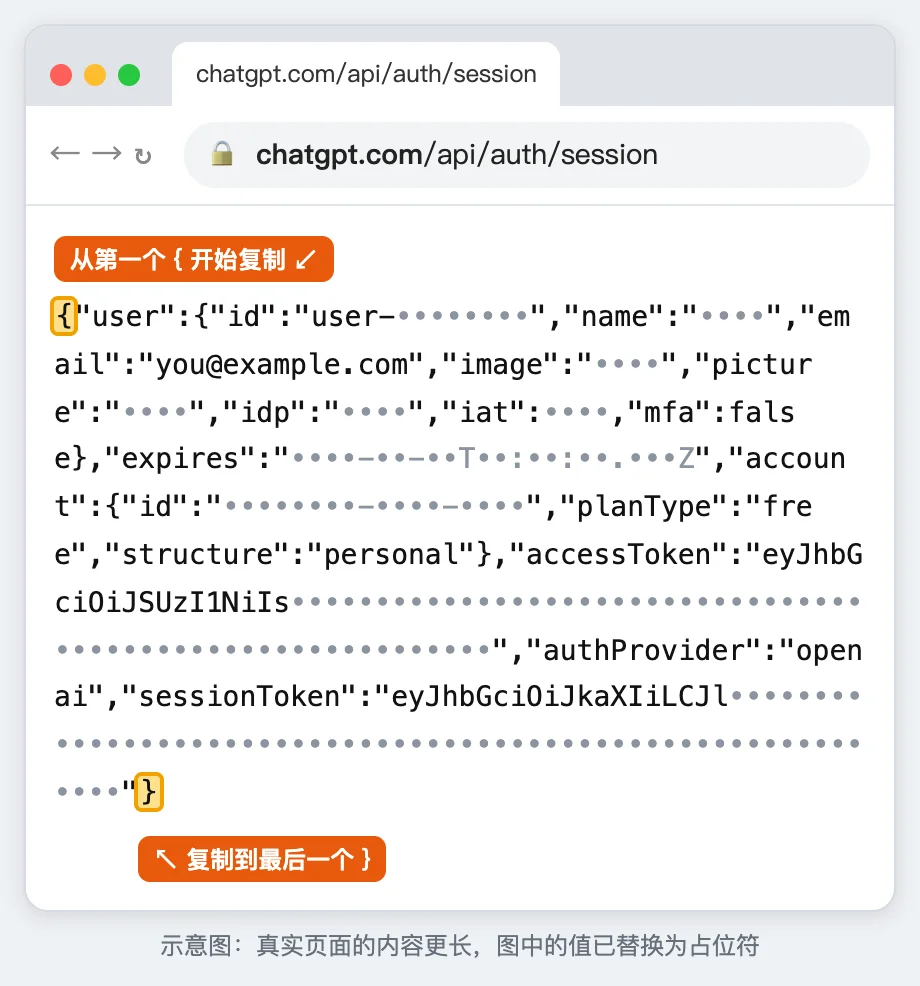
ChatGPT uses this address on the web. When you open it while signed in, your browser displays JSON text starting with an opening brace. It describes the current sign-in, including the account email, account ID, plan type, and tokens such as accessToken and sessionToken. If it is blank, first check that you are signed in to the right account in the same browser and reopen the address.
How to copy it without leaving anything out
- Sign in to chatgpt.com in a desktop browser and check that you are using the account you want to upgrade.
- In a new tab in the same browser, open chatgpt.com/api/auth/session.
- Select all with Command+A or Ctrl+A. Copy the whole block, including the first opening brace and last closing brace.
- Paste the data only into the form on your AI Top-Up order page and submit it there.
Copying only accessToken or missing the first or last characters with a mouse selection are common mistakes. Use Select All.
What AI Top-Up retains and deletes
| Data handling | What we do |
|---|---|
| What we receive | The order page receives the full session JSON. AI Top-Up does not store the original text. |
| Fields extracted | The access token, session token, account email, and account ID are required. AI Top-Up also extracts the user ID or plan type if present. |
| Storage | AI Top-Up stores the extracted session data temporarily in encrypted form. The account email is also kept separately as part of the order record. |
| Use | The data is used to verify the account and complete this top-up. The fulfillment partner processes the fields it needs. If you consent under the current notice, authorized staff may review AI Top-Up’s temporary copy as needed before the top-up is complete. Staff may access data submitted under the previous notice only when manual review is needed. |
| Cleanup | AI Top-Up clears the encrypted session data when the top-up completes or a refund request is accepted. The scheduled cleanup clears data that has reached its 72-hour deadline after submission. |
Before submission, the order page explains how the data is used and handled and asks for your consent. The cleanup rules above apply to the encrypted session data temporarily stored by AI Top-Up. The fulfillment partner manages the data it receives.
Managing your ChatGPT session after a top-up
ChatGPT determines whether your original sign-in session is still valid after AI Top-Up clears its copy. Once your subscription is active, you can use the option in ChatGPT settings to log out of all devices, then sign in again as needed.
If you do not agree to third-party handling of this data, avoid products that require session data. Read the full data and privacy rules.